 RasaBill
POS Billing Software that Runs on Your Phone or Tablet
Turn any Android phone or tablet into a fast point-of-sale counter. Tap items or scan barcodes, print the receipt and take cash, UPI or card — your queue moves in seconds.
- Free to start
- Works offline
- 13 languages
Why shops choose RasaBill
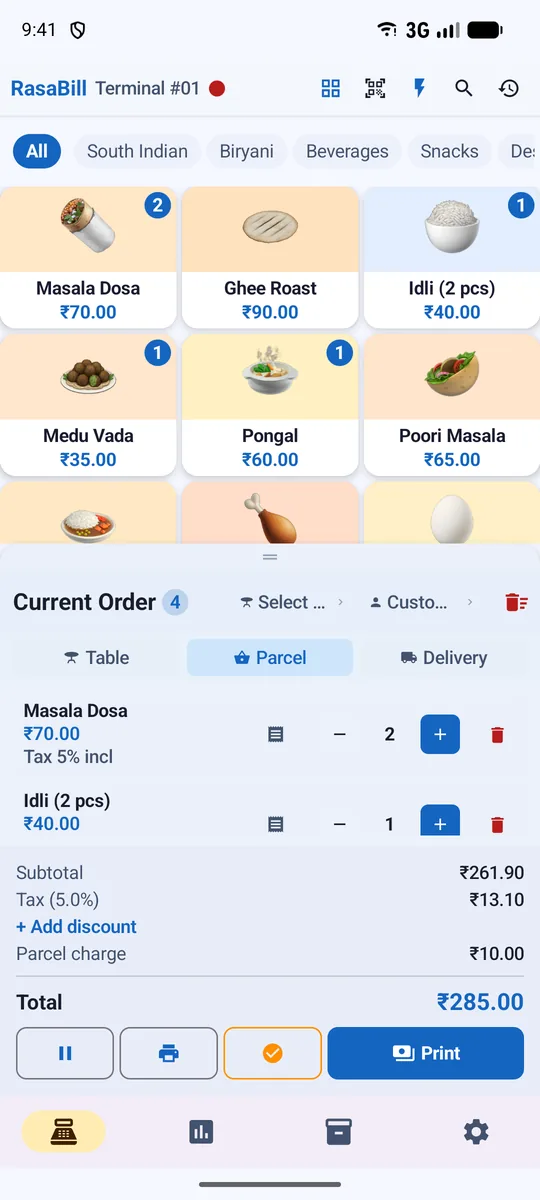
Tap-to-bill grid
Big item tiles with photos and categories; long-press for quantity and notes.
Barcode scanning
Use the phone camera or a USB/Bluetooth barcode scanner gun to add items instantly.
Quick Bill keypad
Type amounts on a calculator-style keypad for fast counters without item lists.
Cash, UPI, card
Show your UPI QR on screen or print it on the receipt; split payment methods in reports.
Any receipt printer
Bluetooth, USB or network thermal printers, 58 mm or 80 mm paper, with cash drawer support.
Shift & daily reports
Open and close shifts with a cash summary, plus daily, weekly and monthly sales reports.
Built for busy counters
RasaBill is designed for the moment a customer is waiting: one tap adds an item, one tap prints. Hold a bill for later, give a discount, add parcel or delivery charges, and reprint any old bill from history.
- Hold and resume bills, KOT printing for kitchens
- Item-wise or bill-wise discounts and loyalty points
- Share the bill as PDF on WhatsApp — long-press Print
- Low-stock alerts while you sell
Phone, tablet or both
Use a phone at a small counter or a tablet with a wide item grid at a bigger one. Add more phones with a QR code and they share items, bills and stock in real time.
Start in 3 simple steps
Download RasaBill
Free from Google Play on your Android phone or tablet.
Pick your shop type & add items
Use the starter list for your business or bulk-upload your own items.
Print or share your first bill
Connect a receipt printer or send the bill on WhatsApp.
Frequently asked questions
What hardware do I need for RasaBill POS?
Just an Android phone or tablet. Add a Bluetooth or USB thermal printer for receipts and, if you like, a barcode scanner and cash drawer.
Does the POS work without internet?
Yes. Billing, printing and reports work offline. Sync and cloud backup run when the internet is back.
Can I use a barcode scanner gun?
Yes. USB and Bluetooth scanners that type like a keyboard work in Billing and Inventory — scan and the item is added to the cart.
Can several counters bill at the same time?
Yes. Join extra phones to your shop with a QR code; all of them share items, stock and sales.
Start billing in 2 minutes
Download RasaBill free from Google Play. No card, no setup fee — add your items and print your first bill today.