RasaBill
GST Billing Software for Small Businesses in India
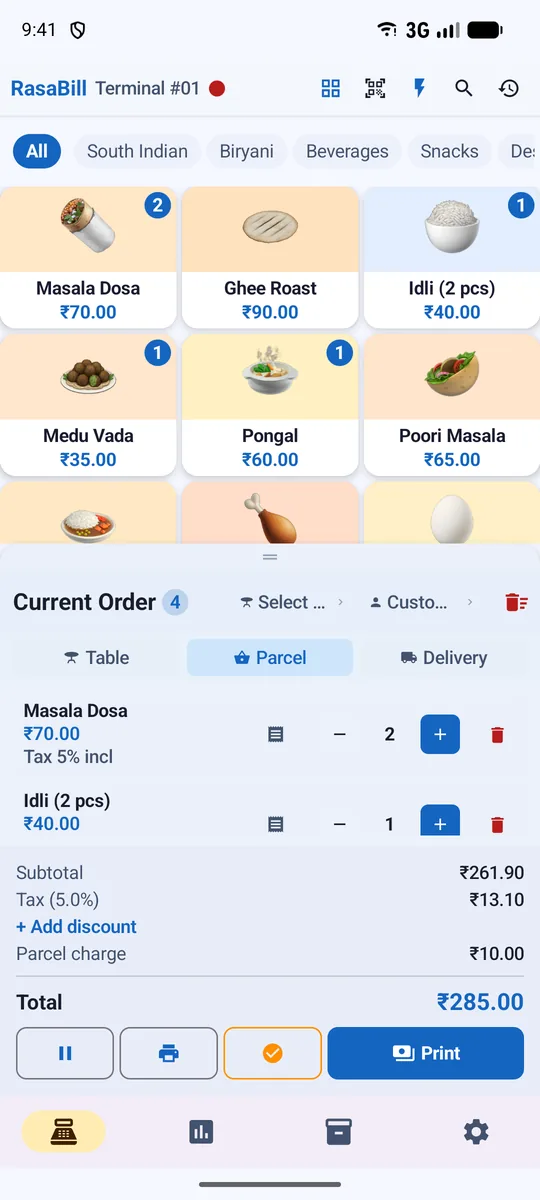
Make GST bills in seconds on your phone or tablet. RasaBill works out CGST, SGST or IGST for every item, prints the tax on the receipt and gives you the reports your accountant needs for GST filing.
- Free to start
- Works offline
- 13 languages
Why shops choose RasaBill
Item-wise GST
Set a GST rate per item (0%, 5%, 12%, 18%, 28% or any rate), tax-inclusive or tax-exclusive prices.
HSN & SAC codes
Search HSN codes by everyday names like paneer, biscuits or mixture, or use the restaurant service code 996331.
GSTR-1 & 3B figures
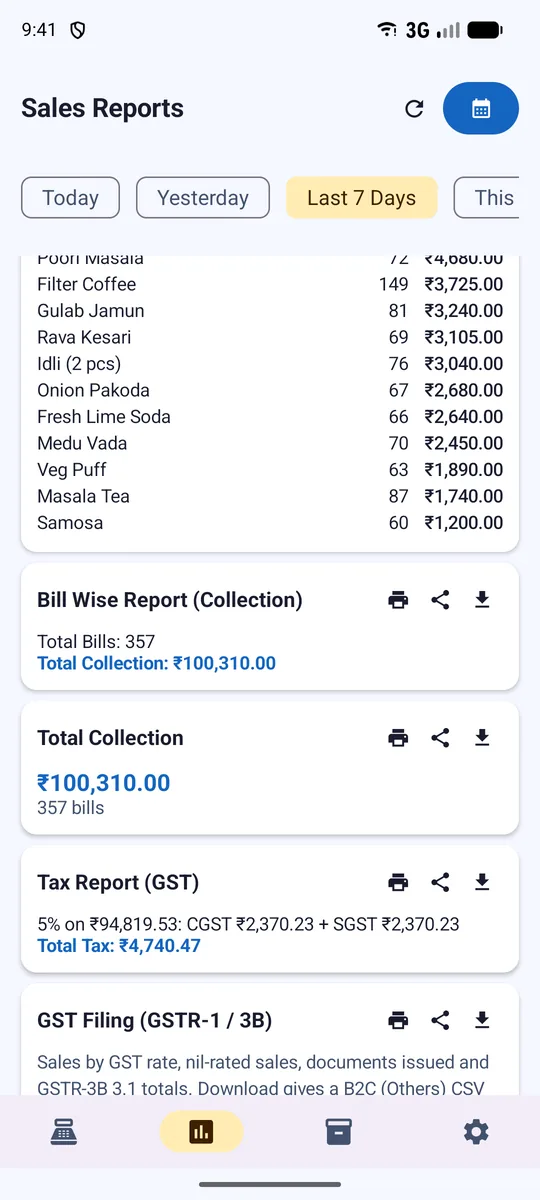
GST Filing report with B2C rate-wise totals, HSN summary (Table 12) and CSV in the GST Offline Tool format.
Tax on the receipt
CGST/SGST or IGST lines printed on the bill, or one "Incl. tax" line — your choice.
Works offline
Bill without internet; reports are on your phone. Backup to Google Drive when online.
13 languages
Use the app in English, Hindi, Tamil, Telugu, Kannada, Marathi, Gujarati, Bengali and more.
What makes a GST bill correct?
A GST invoice needs your GSTIN, a bill number, the date, each item with its rate and tax, and the tax split as CGST + SGST (inside your state) or IGST (outside it). RasaBill fills all of this in automatically from your shop settings and item rates.
- Set your GSTIN once in Settings → Company
- Give each item its own GST rate and HSN code, or use one shop-wide rate
- Choose CGST/SGST or IGST and how tax appears on the receipt
- Bill numbers continue automatically, with an optional daily reset
GST reports for filing
Reports → Tax shows tax collected per rate. The GST Filing report gives the B2C figures for GSTR-1 (Tables 7, 8 and 13) and GSTR-3B section 3.1, and the HSN Summary covers Table 12. Download them as CSV and hand them to your accountant or upload through the GST Offline Tool.
Start in 3 simple steps
Download RasaBill
Free from Google Play on your Android phone or tablet.
Pick your shop type & add items
Use the starter list for your business or bulk-upload your own items.
Print or share your first bill
Connect a receipt printer or send the bill on WhatsApp.
Frequently asked questions
Is RasaBill free for GST billing?
Yes. You can download RasaBill free from Google Play and make GST bills, print receipts and see tax reports. Premium adds features such as customers, tables, cloud backup and several phones.
Does RasaBill support CGST, SGST and IGST?
Yes. Choose CGST + SGST for sales inside your state or IGST for inter-state sales. The tax split is printed on the bill and shown in reports.
Which HSN code should I use for my items?
Tap search next to the HSN field to find common items by name (for example paneer, namkeen or biscuits). Restaurants serving food use the service code 996331. Always confirm the GST rate for your item; turnover up to ₹5 crore only needs the 4-digit HSN.
Can I file GSTR-1 from RasaBill?
RasaBill gives you the GSTR-1 B2C, HSN summary and GSTR-3B figures and a CSV for the GST Offline Tool. Filing itself is done on the GST portal by you or your accountant.
Can I make non-GST bills too?
Yes. Leave tax off for shops that are not GST registered, or set 0% on exempt items. Bills then print without tax lines.
Start billing in 2 minutes
Download RasaBill free from Google Play. No card, no setup fee — add your items and print your first bill today.